How to See Who Unfollowed You on Instagram (Without an App)
Instagram won't tell you who unfollowed — but your own data export will. Here's the safe way to find out, with no password apps required.

If you've been wondering who quietly slipped out of your followers list, the short answer is this: Instagram doesn't tell you, but your own data export does. You can find who unfollowed you on Instagram without handing your password to any third-party app, without installing anything, and without risking your account.
This guide walks the safe path step by step, then explains why every shortcut is riskier than it looks.
[!info] Quick answer: Instagram won't tell you who unfollowed, but you can find out from your own data export — no password app required. The fastest way: request your Instagram data archive from Meta, drop the ZIP into hooleft.me, and we'll show you who slipped away in seconds. No login, no risk.
Why "unfollower tracker" apps are riskier than they look
The classic unfollower tracker is an app or website that asks for your Instagram username and password. Once it has those, it logs in as you, scrapes your followers list on a schedule, and stores the snapshots so it can show you who left between visits.
There are three problems with that arrangement, in order of how often they bite people.
The first is account safety. Instagram's terms of service forbid third-party tools from logging in on your behalf. When Instagram's anti-automation systems notice a foreign IP polling your followers, the usual response is a temporary block — and the not-so-rare response is a permanent ban. You don't get a warning, and the appeal queue is famously slow.
The second is data trust. The app holding your password also holds your DMs, your saved posts, your phone number, and your two-factor backup codes. Many of these apps are run by small teams in jurisdictions where data protection is, gently put, not their headline feature. A breach there is a breach of your whole Instagram.
The third is the slow drift. Even when nothing goes wrong, you've given a third party persistent read access to your account. Every story view, every reel like, every DM thread — it's all on their servers, indexed for whatever future feature they decide to build. You can't take that back later. If you want the full reasoning, the case for an Instagram unfollower tracker that never asks for your password lays it out in detail.
There's a calmer way that doesn't trade safety for convenience — and it's the one we built hooleft.me around.
The safer path: your own Instagram data export
Instagram lets you request a complete archive of your own account at any time. It's a feature they built for the EU's data-portability rules under GDPR, and they make it available worldwide. Inside the archive: your posts, your messages, your followers list, your following list, your story interactions — everything Instagram holds about you, in a folder that lives on your own machine.
To find your unfollowers, you only need two files from that archive: the followers list and the following list. Compare today's followers list against one from a month ago, and the people missing from the newer one are your unfollowers.
You don't need a password app. You don't need to grant browser permissions. You don't need to install anything new. Instagram hands you the data; you read it.
The one catch: the data export is a snapshot. You can't go back in time. So the workflow is: download an export now, save it somewhere, download another one in a month, then compare. Or use a tracker that does the comparison for you. (We'll get to that.) If you've landed here because the number dropped overnight, it's worth reading why an Instagram follower count can drop suddenly before you assume the worst — most of it is routine.
Step-by-step: get the export and find who left
These are the exact steps. They match the structured HowTo block in this page's metadata — so search engines and AI assistants can extract them directly.
-
Sign in to Instagram on desktop, not the mobile app. The mobile app's data download is less reliable and ships a smaller archive.
-
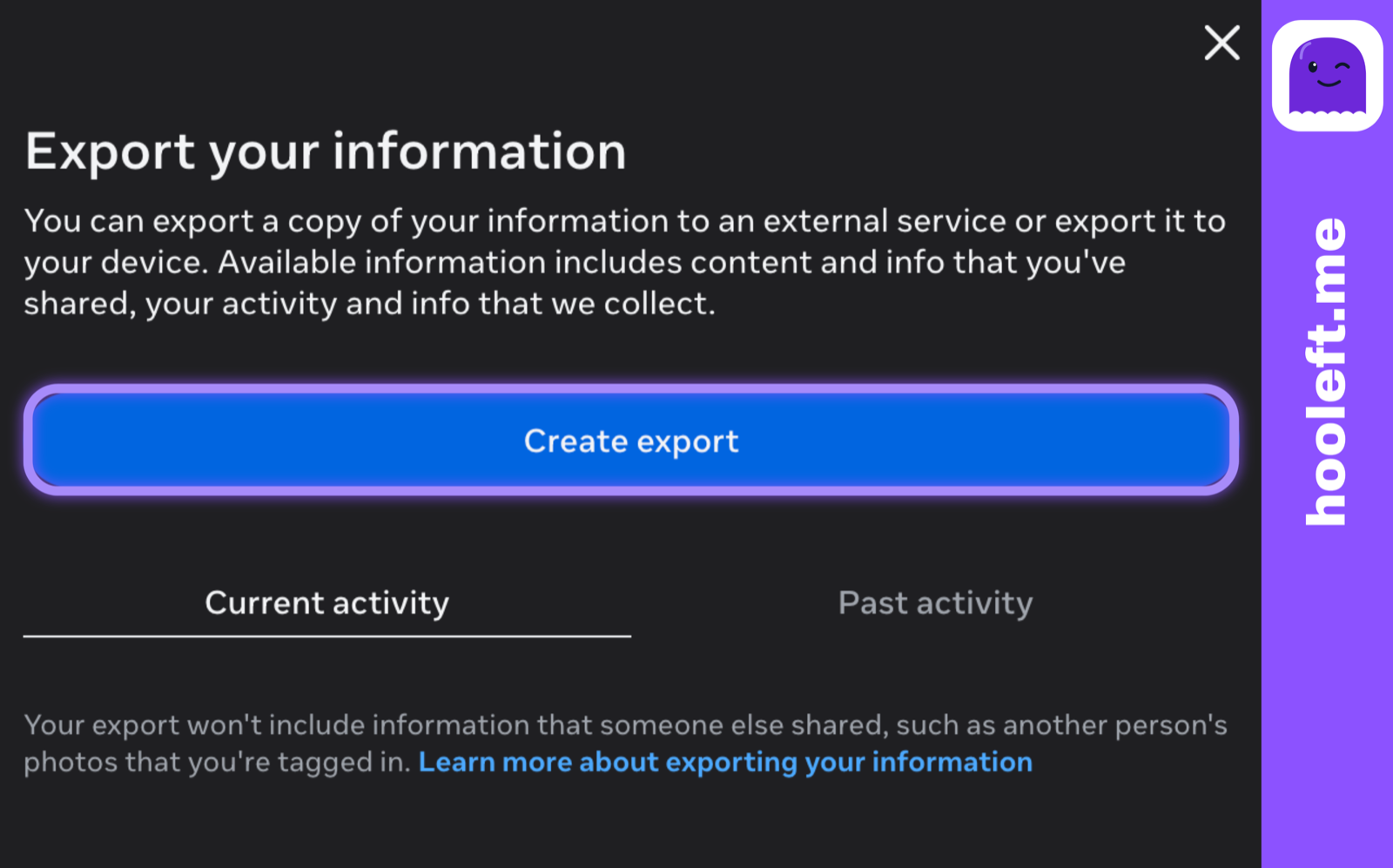
Open Settings, then Accounts Centre, then Your information and permissions, then Download your information. On the Export your information screen, click Create export. The button is sometimes labelled "Request a download" depending on your locale.
-
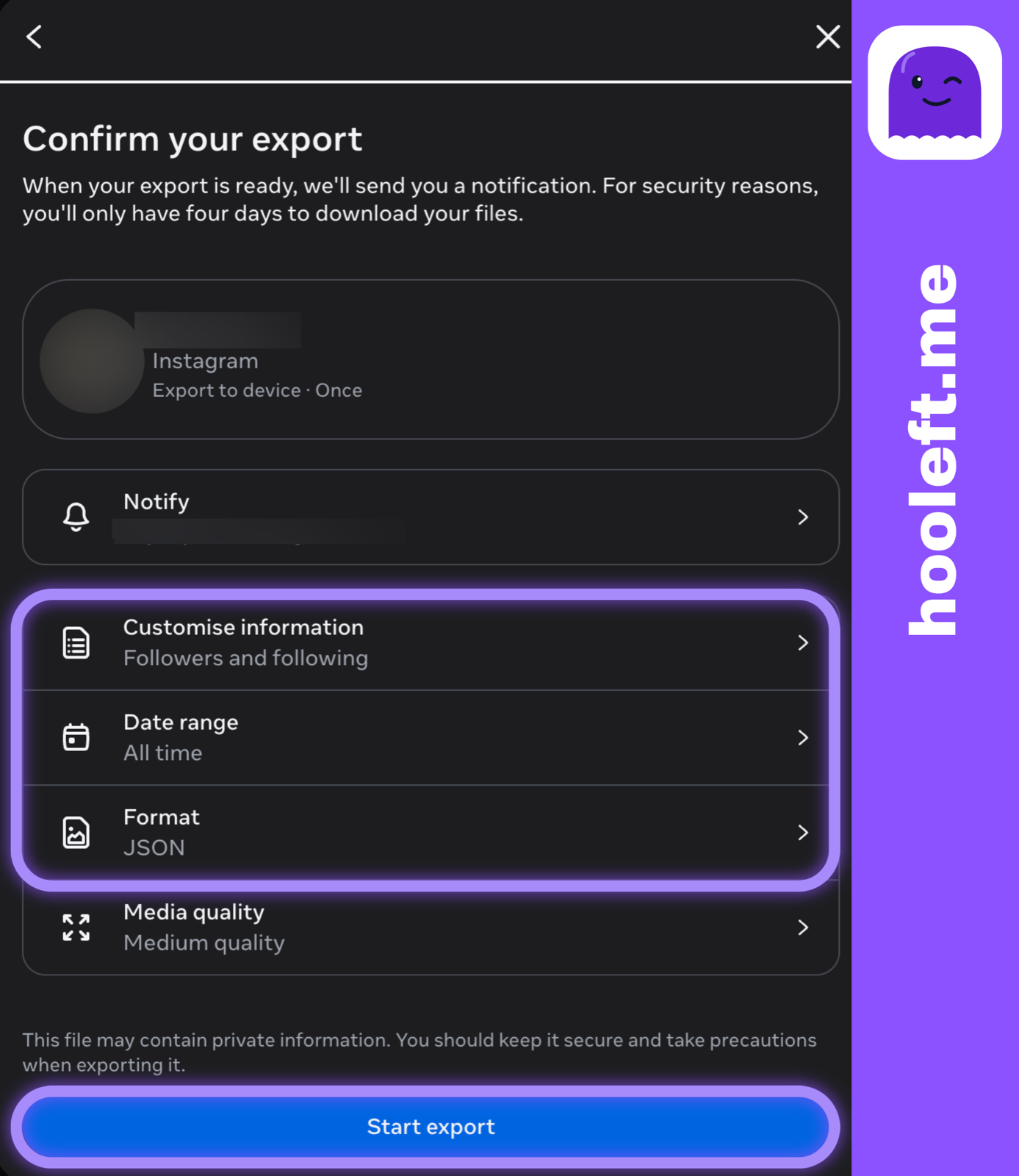
Choose JSON format, not HTML, and set the date range to All time. JSON is easier for any tracker to parse, the files are smaller, and it's what we expect at hooleft.me.
-
Submit the request and wait. Instagram emails the download link when the archive is ready — usually in under 4 hours, sometimes up to 48. The email link expires after a few days, so don't sit on it.
-
Download and unzip the archive. Inside, look for a folder named
followers_and_following(Instagram occasionally renames it). The two files you want arefollowers_1.jsonandfollowing.json. -
Compare today's followers list with last month's. Names that appear in the older
followers_1.jsonbut not the newer one are your unfollowers.
If comparing JSON files sounds tedious — it is, especially over a few hundred followers — you can drop the ZIP into hooleft.me and we'll do the comparison automatically. We never see your password, we never log into your account, and we delete the original ZIP within 24 hours.
Apps vs your data export — at a glance
| Approach | Needs password | Risk of ban | Privacy | Cost |
|---|---|---|---|---|
| Third-party password app | Yes | High | Low (they keep your login) | $5-$15 / month |
| Browser extension | Sometimes | Medium | Medium (less data, but still active) | Free to $5 / month |
| Your own Instagram data export | No | None | High (you keep the data) | Free |
| Data-export tracker like hooleft.me | No | None | High (we delete after parsing) | Free tier; hooleft.me Pro |
The bottom row is the calm option. The top row is the one most search results push, because affiliate fees exist and password apps pay them. We don't take affiliate kickbacks; we'd rather you keep your account. If you'd like to weigh the whole field yourself, our round-up of the best Instagram unfollower tracker in 2026 scores each approach on safety, cost, and accuracy.
A short note on privacy
A reasonable question: if you upload a ZIP that contains the usernames of people who follow you, isn't that processing their data without their consent?
We've thought about this carefully. The usernames in your export are already public on Instagram. We process them only to show you the comparison you asked for. We never contact those accounts, never share their usernames outside your own results, and never use them to build a profile of anyone. The legal basis we rely on is called legitimate interest — it's your own data, processed only to show you the comparison you asked for.
We process this data because there's no useful way to answer the question "who unfollowed me?" without it, the data is already public, and we keep it isolated to your own results. That's the bar we hold ourselves to. If you ever want it deleted, one email and it's gone.
FAQ
Does this work without my Instagram password?
Yes. You request your own data archive directly from Instagram. No third party ever sees your password.
How long does the Instagram data export take?
Anywhere from a few minutes to 48 hours, depending on Instagram's queue. Most exports arrive in under 4 hours.
Can Instagram tell I'm using a tracker?
No. You're only reading data Instagram already gave you. There's nothing to detect, nothing to flag.
Will this show me people who blocked me?
Partially. Blocks remove the relationship in both directions, so a former follower who has now blocked you will show up as "no longer following" — but you can't tell blocking apart from a quiet unfollow from the export alone.
How often should I check?
Once a month is plenty. Daily checks turn a healthy habit into anxiety, and the data export doesn't update in real time anyway.
Now what
Once you have the list, the rest is yours. Some people just look. Some clean up their own following list to match. Some screenshot the surprise to a group chat and move on. There's no wrong answer — the goal was to know, and now you know. If a name on the list stings, it's worth remembering why people unfollow on Instagram — it's almost never personal. And if you just want the quickest read on who unfollowed you on Instagram, that post is the short version of this one.
If you'd rather skip the JSON wrangling, that's literally what hooleft.me is for: same data, same privacy, less squinting. Drop the ZIP in and you'll see who left in seconds — no password, no app install, no second-guessing.
Related
Instagram Blocked vs Unfollowed: What's the Difference?
Blocked and unfollowed both remove someone from your followers list, but they mean very different things. Here is how to tell which one happened and what your data shows.
What Permissions Do Instagram Unfollower Apps Actually Need?
Most unfollower apps request far more account access than the job requires. Here is what each OAuth scope grants and why an export-based tool is different.
Are Instagram Unfollower Trackers Worth Paying For?
Instagram unfollower trackers range from free to $15 a month. Here is what each price point actually delivers — and an honest look at when free is genuinely enough.
See who stopped following, without a password.
hooleft.me compares the export Instagram already gives you. We never log into your account. No card to start, and Pro is $49 a year.
Start freeNo export yet? How to request it from Instagram